
INDUSTRIAL VISUALIZATION STUDIO

Industrial 3D Visualization From Engineering CAD

TM8 transforms engineering CAD into clear, technically accurate visual communication.

Industrial machine converted from engineering CAD into technical 3D visualization

CAD → RENDER

17+

CAD formats

FIXED

Timeline

NDA

Standard

15+

Years of experience

Native CAD Input

STEP

IGES

INVENTOR

CREO

SIEMENS NX

PARASOLID

+10 MORE

02

INDUSTRIES

Built around the problems engineering teams actually have

Every sector below shares one issue: the product is too complex, too internal or too inaccessible to explain with photography alone.

Industrial machinery icon.

Industrial Machinery

Explain complex machines and assemblies.

EXAMPLES

Gearboxes, conveyors, packaging systems and more.

Industrial machinery icon.

Industrial Machinery

Explain complex machines and assemblies.

EXAMPLES

Gearboxes, conveyors, packaging systems and more.

Oil and gas equipment icon.

Oil & Gas & Energy

Visualize equipment that is difficult to photograph or access.

EXAMPLES

Valves, pumps, compressors, subsea equipment and more.

Oil and gas equipment icon.

Oil & Gas & Energy

Visualize equipment that is difficult to photograph or access.

EXAMPLES

Valves, pumps, compressors, subsea equipment and more.

Food processing icon.

Food Processing

Show internal processes and production workflows.

EXAMPLES

Processing systems, packaging lines, mixers and more.

Food processing icon.

Food Processing

Show internal processes and production workflows.

EXAMPLES

Processing systems, packaging lines, mixers and more.

Engineering products icon.

Engineering Products

Present technical products with clarity and precision.

EXAMPLES

Industrial components, OEM products and assemblies.

Engineering products icon.

Engineering Products

Present technical products with clarity and precision.

EXAMPLES

Industrial components, OEM products and assemblies.

03

USE CASES

What you actually order

Core visualization types cover most industrial communication needs. Pick the format that best matches what your technical audience needs to understand.
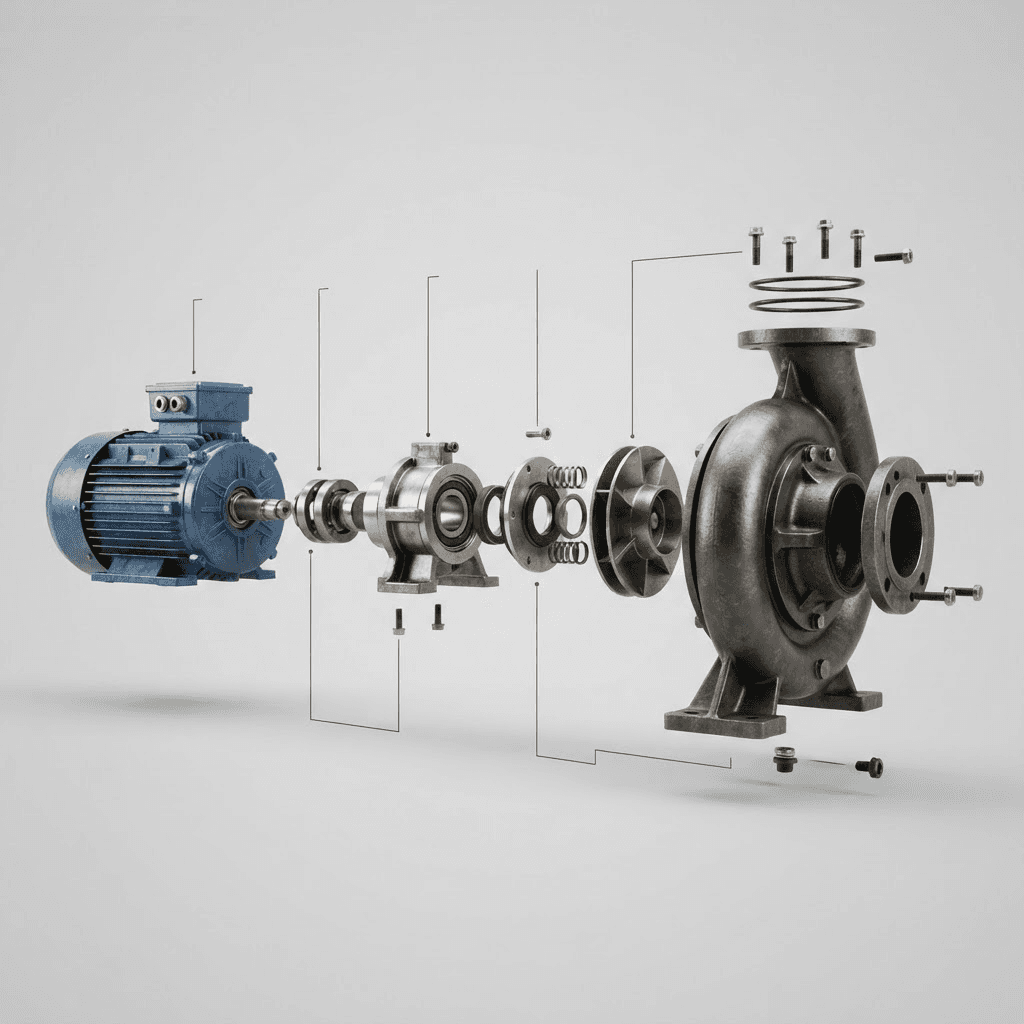
Industrial exploded assembly render showing how product components fit together.

A

Exploded Assembly

Show how components fit together.

Industrial cutaway render showing internal mechanisms and hidden technical systems.

B

Internal Mechanisms & Cutaways

Reveal hidden processes and internal systems.

Technical product render highlighting key features for sales and engineering teams.

C

Product Highlights

Communicate key technical advantages.

04

CAD → VISUALIZATION PROOF

Your engineering model is the starting point, not a reference

No re-modeling, no approximation, no artistic interpretation of your mechanics. The geometry you send is the geometry that gets rendered.

A

CAD

Native engineering geometry, imported as delivered.

Production scene setup with materials, lighting rig and camera framing around the CAD model.

B

Production scene

The material setup, lighting rig and cameras are built around the model.

Final rendered industrial 3D visualization, ready for animation or still delivery.

C

Final Delivery

Rendered animation and stills, ready to publish.

INTERACTIVE BEFORE / AFTER

Final industrial 3D render created from the engineering CAD model
Engineering CAD model used as the source for industrial 3D visualization
CAD
FINAL RENDER

Drag to compare - same geometry, no remodeling.

SUPPORTED DELIVERABLES

Animation

Still Images

Trade show loops

Sales assets

Website Visuals

05

WHY TM8

Technical evidence, not marketing claims

CAD-First Workflow

We start from engineering models, not from sketches or photographs.

Engineering CAD model used as the starting point for CAD-based industrial visualization.

A

Fixed Product Model

Predictable scope.

Predictable cost.

Predictable deadline.

Engineering Accuracy

Mechanisms.

Proportions.

Cross-sections.

Industrial 3D visualization scene with materials, lighting and render setup prepared for final output.

B

Secure Collaboration

NDA

Secure Upload

CAD Auto-Purge.

Piotr Wołoszyński, founder and Senior Industrial 3D Generalist at TM8.

Direct Technical Ownership

I bring over 15 years of 3D production experience, including staff roles at TechnipFMC and Ars Thanea. My background combines industrial visualization with high-end advertising production. At TM8, you work directly with me from CAD review through final delivery. I personally handle CAD preparation and 3D production, without passing the work to subcontractors.

Piotr Wołoszyński Founder & Senior Industrial 3D Generalist

06

PROCESS

A controlled workflow from CAD upload to final delivery

Each project moves through clear technical checks, a draft approval stage and final rendering only after the sequence is understood.

1

Technical Alignment

We confirm the project goal, CAD files, key mechanisms, flow direction, sections, hidden parts and anything that must not be shown. We review CAD files, drawings, storyboards or process references before final production begins.

NDA

CAD Upload

CAD Verification

Intent Check

1

Technical Alignment

We confirm the project goal, CAD files, key mechanisms, flow direction, sections, hidden parts and anything that must not be shown. We review CAD files, drawings, storyboards or process references before final production begins.

NDA

CAD Upload

CAD Verification

Intent Check

2

Draft Production

A low-resolution animatic is created first, focused on sequence, camera motion, timing and technical logic.

Scene Setup

Camera Blocking

Motion Draft

Animatic

2

Draft Production

A low-resolution animatic is created first, focused on sequence, camera motion, timing and technical logic.

Scene Setup

Camera Blocking

Motion Draft

Animatic

3

Client Approval

/ Approval Required

Final rendering starts only after draft approval. You review the animatic before final production begins. Changes to sequence, flow direction and technical behavior belong here.

Draft Review

Corrections

Approval to Render

3

Client Approval

/ Approval Required

Final rendering starts only after draft approval. You review the animatic before final production begins. Changes to sequence, flow direction and technical behavior belong here.

Draft Review

Corrections

Approval to Render

4

Final Rendering & Delivery

After approval, final materials, lighting and render quality are produced. The final review is for polish, not rebuilding the approved sequence.

Final Render

Final Review

Delivery

CAD Purge

4

Final Rendering & Delivery

After approval, final materials, lighting and render quality are produced. The final review is for polish, not rebuilding the approved sequence.

Final Render

Final Review

Delivery

CAD Purge

07

PROJECT BUILDER

Configure your project, see the price before you talk to anyone

Five inputs are enough to produce a realistic scope, package price and delivery window. No form-first gatekeeping.

Step 01Visualization Type
Industrial product visualization highlighting key components and features
Step 02Deliverables
Step 03Visualization Subject
Step 04Visual Style
Step 05Add-ons
Step 01Visualization Type
Industrial product visualization highlighting key components and features
Step 02Deliverables
Step 03Visualization Subject
Step 04Visual Style
Step 05Add-ons

08

FAQ

The questions that actually block a decision

CAD FILES & INPUT MATERIALS

PRICING, SCOPE & PROJECT CONFIGURATION

PROCESS, TIMELINE & REVIEWS

DELIVERABLES & USAGE RIGHTS

SECURITY & FILE TRANSFER

PAYMENTS, INVOICES & CANCELLATION

What CAD formats do you support?

+

Do I need to prepare my CAD files first?

+

What if I only have drawings or references, but no CAD?

+

Can I send storyboard, script or technical references?

+

09

START

Turn Engineering CAD Into Clear Visual Communication

TM8

Industrial 3D visualization from engineering CAD. NDA standard, fixed pricing, senior technical ownership.

© 2026 TM8